Booking Types categorize how research resources are utilized, ensuring that time slots are labeled accurately for scheduling, reporting, and billing purposes. While Users are restricted to standard operational categories, Provider Admins have the flexibility to classify time for technical requirements, staff-led sessions, or equipment downtime.
¶ Managing Booking Types
Provider admininstrators are able to manage the pre-defined booking types that are available in OpenIRIS as well as adding custom booking types that can are applied to that specific Provider. Custom booking types can be made in addition to the standard booking types to better fit the specific workflows of their Provider.
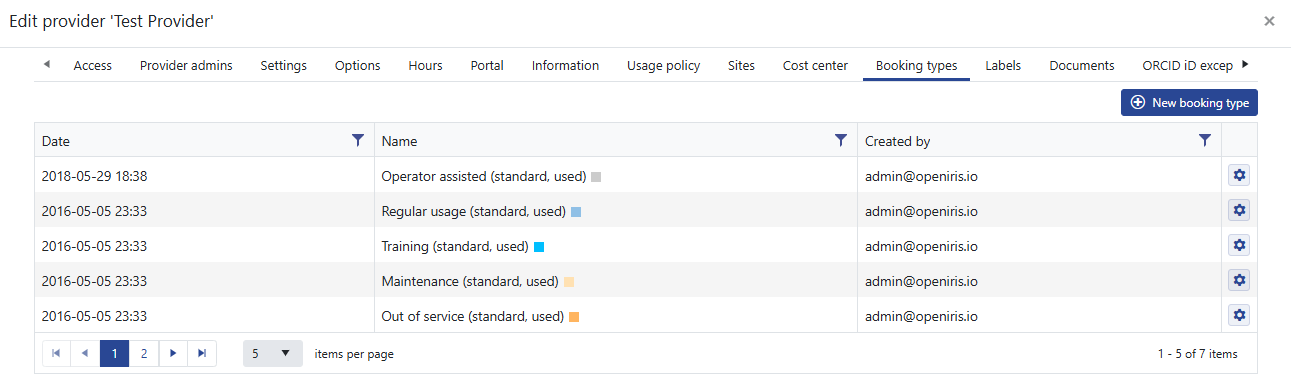
Location: Provider settings > 'Booking Types' tab
 |
|---|
| Default booking types |
The standard pre-defined booking types are:
- Regular Usage: Standard autonomous user operation.
- Operator Assisted: Sessions requiring a technician or expert staff.
- Training: Dedicated time for onboarding new users on a resource.
- Maintenance: Scheduled technical upkeep or calibrations.
- Out of Service: Unscheduled downtime or repairs.
Custom Booking Types:
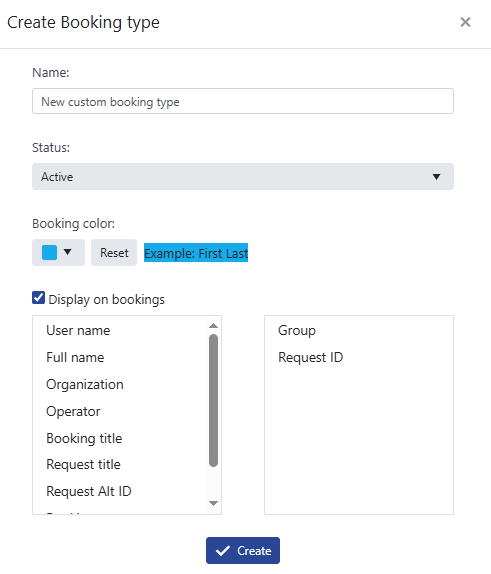
A new booking type can be added by clicking on the 'New Booking type' button. You can give the new booking type a name and choose a colour that will be displayed in the Scheduler when this booking type is selected. You can also choose what should be displayed on the booking record in the Scheduler, for example in the image below the group and request ID will be displayed instead of the users name.
 |
|---|
| Create custom booking type |
¶ Selecting a Booking Type
Provider admininstrators can select a booking type in the booking window for any bookings of Resources in their Provider. In the booking window there is a dropdown menu displaying all available booking types for that Provider.
 |
|---|
| Change booking type |
If Operator Assisted booking is enabled for a resource then the users will be able to select this option otherwise by default all bookings made by users are of the type Regular Usage.